If you use Unifi, it has a nifty zero-config VPN that allows you to both access and route traffic via your home network called Teleport. One issue I was running into though was that for some reason, my teleport client (iOS device in this case) didn’t get any DNS resolution ability.
My setup is I have the default VLAN 1 configured as subnet 192.168.11.0/24 and it has a dedicated pihole DNS server which is served as the DNS server for clients in this VLAN via DHCP. It turns out that Teleport VPN by default uses the same DNS server setting (the one you have for VLAN 1) as the DNS server setting for clients connecting via Teleport VPN. This information is not easily available and I had to use the Net Analyzer app on iOS to figure out what was being handed out as DNS server by my Unifi router when the Teleport client connected to it.
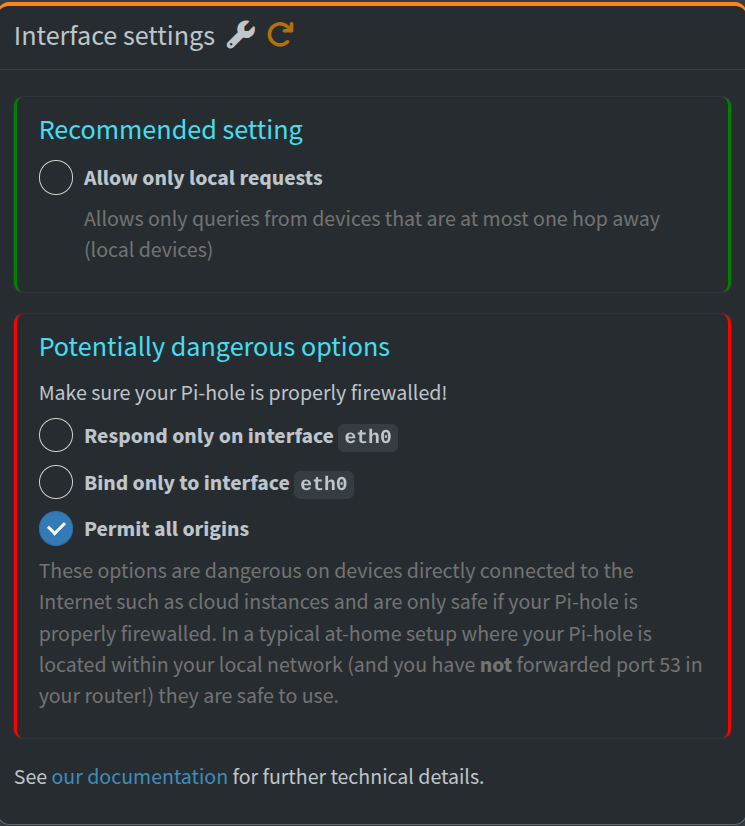
After this, I figured out the issue is that my Pihole server on 192.168.11.0/24 subnet is configured to only allow local requests (as in, only answer DNS requests from devices in the same subnet). This explained why the Teleport client did not get any DNS resolution – the Teleport clients get put on the next free subnet available in your setup (in my case VLAN 3 was picked and Teleport clients were in the 192.168.3.0/24 subnet).
The fix was simple – enable the “Permit All Origins” option in Pihole and now my Teleport clients have proper DNS resolution as expected.