In the previous post we setup inbound and outbound SMS routing through a LAN Asterisk server using a voip.ms SIP trunk. In this post we will make use of this functionality to allow a Home Assistant instance in the LAN to send notifications via SMS. The nice thing about this setup is that critical notifications can be sent to the device(s) even if it is outside the LAN and even outside reach of data connectivity.
Network Architecture
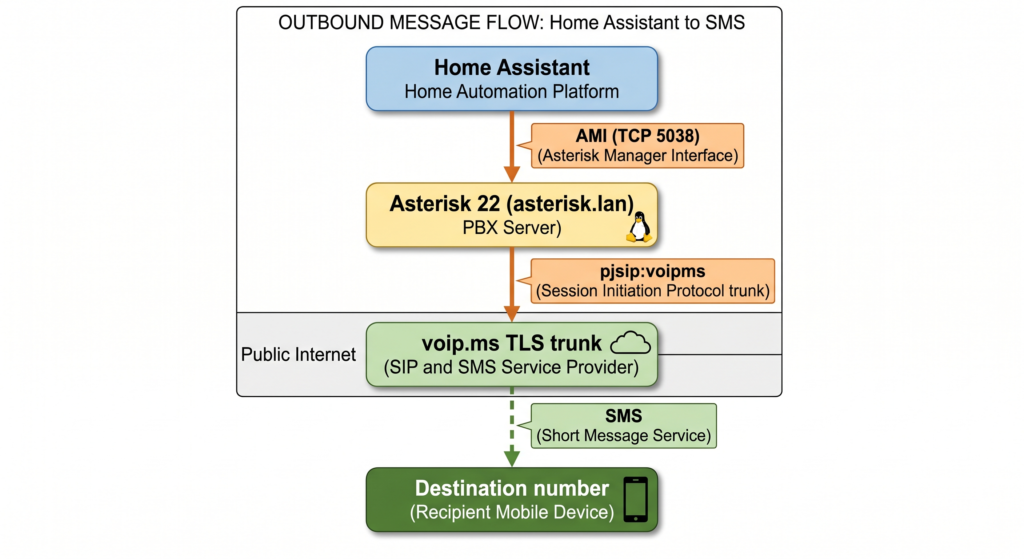
The architecture involves Home Assistant running a connector which connects to the Asterisk server over the Asterisk Management Interface (AMI). The dialplan on Asterisk picks up the messages and sends them over the voip.ms trunk just like any other outbound message.
Asterisk Setup
Enable AMI
Edit /etc/asterisk/manager.conf to add:
[general]
enabled = yes
port = 5038
bindaddr = 0.0.0.0

[homeassistant]
secret = your_ami_password
read = originate
write = originate
deny = 0.0.0.0/0.0.0.0
permit = <HA_Static_IP|HA_Subnet>/255.255.255.255 ; replace with 255.255.255.0 for subnet (or as appropriate for your subnet)
Since AMI is a powerful surface, keeping it restricted to known hosts is a good idea. We configure a user (homeassistant) with a secure password and restrict it to read = originate and write = originate which gives permissions to this user for channel originates. Note however that this a weak restriction as AMI is powerful and the user can circumvent this to do other actions quite likely if they wanted to.
Reload by running asterisk -rx "manager reload"
Dialplan for Home Assistant
We add a dedicated context for HA messages – we take the alert text and destination number as channel variables from the AMI originate action and trigger a message send over the voip.ms trunk. I created /etc/asterisk/homeassistant-extensions.conf with the following:
[ha-sms]
exten => _X.,1,NoOp(HA alert SMS to ${EXTEN})
 ; Message body is passed as a channel variable from AMI
 same => n,Set(MESSAGE(body)=${HA_SMS_BODY})
 same => n,Set(MESSAGE(from)=sip:<DID_Number>@asterisk.lan)
 same => n,MessageSend(pjsip:voipms/sip:${EXTEN}@<POP Server>,sip:<DID_Number>@<POP Server>)
 same => n,Log(NOTICE, HA SMS to ${EXTEN} status: ${MESSAGE_SEND_STATUS})
 same => n,Hangup()
Then included it in /etc/asterisk/extensions.conf with #include homeassistant-extensions.conf
Reload the dialplan with asterisk -rx "dialplan reload". With this dialplan setup, Home Assistant is expected to send an Originate action with the local channel (Local/NUMBER@ha-sms) to the ha-sms context. The message body is expected in the HA_SMS_BODY variable.
Home Assistant Setup
Custom Notify Component
HA has some Asterisk Integrations. But in the age of AI, it is easier to just build a small, custom component for what we want. Essentially we just need to open the TCP socket, authenticate and send some text across to the Asterisk server. Create the following under your HA config directory:
custom_components/asterisk_sms/
    __init__.py
    manifest.json
    notify.py
__init.py__ — empty file.
manifest.json:
{
  "domain": "asterisk_sms",
  "name": "Asterisk SMS",
  "version": "1.0.0",
  "documentation": "",
  "dependencies": [],
  "codeowners": [],
  "requirements": []
}
notify.py:
import socket
import logging
from homeassistant.components.notify import BaseNotificationService, ATTR_TARGET

_LOGGER = logging.getLogger(__name__)

CONF_HOST     = "host"
CONF_PORT     = "port"
CONF_USERNAME = "username"
CONF_PASSWORD = "password"


def get_service(hass, config, discovery_info=None):
    return AsteriskSMSNotificationService(
        host     = config.get(CONF_HOST, "asterisk.lan"),
        port     = config.get(CONF_PORT, 5038),
        username = config[CONF_USERNAME],
        password = config[CONF_PASSWORD],
    )


class AsteriskSMSNotificationService(BaseNotificationService):

    def __init__(self, host, port, username, password):
        self.host     = host
        self.port     = port
        self.username = username
        self.password = password

    def send_message(self, message="", **kwargs):
        targets = kwargs.get(ATTR_TARGET) or []
        if not targets:
            _LOGGER.error("asterisk_sms: no target number specified")
            return
        if isinstance(targets, str):
            targets = [targets]
        for number in targets:
            self._send(number, message)

    def _send(self, number, message):
        try:
            with socket.create_connection((self.host, self.port), timeout=10) as s:
                s.recv(1024)  # AMI banner

                self._ami(s, (
                    f"Action: Login\r\n"
                    f"Username: {self.username}\r\n"
                    f"Secret: {self.password}\r\n"
                ))
                self._ami(s, (
                    f"Action: Originate\r\n"
                    f"Channel: Local/{number}@ha-sms\r\n"
                    f"Application: Wait\r\n"
                    f"Data: 2\r\n"
                    f"Variable: HA_SMS_BODY={message}\r\n"
                    f"Async: true\r\n"
                ))
                self._ami(s, "Action: Logoff\r\n")

            _LOGGER.info("asterisk_sms: sent to %s", number)

        except Exception as exc:
            _LOGGER.error("asterisk_sms: AMI error sending to %s: %s", number, exc)

    @staticmethod
    def _ami(sock, action):
        sock.sendall((action + "\r\n").encode())
        sock.recv(4096)
configuration.yaml
notify:
  - platform: asterisk_sms
    name: asterisk_sms
    host: asterisk.lan
    port: 5038
    username: homeassistant
    password: your_ami_password
Restart Home Assistant after adding the component and configuration.
Testing
Verify AMI is listening
From any LAN host:
telnet asterisk.lan 5038You should see the AMI banner: Asterisk Call Manager/X.X
Test from HA Developer Tools
In Home Assistant, Go To Settings > Developer Tools > Actions
Select notify.asterisk_sms and fill in:
- Message:
test alert - Target:
1XXXXXXXXXX
Hit Perform Action. Watch Asterisk logs for confirmation:
asterisk -rvvvYou should see:
NOTICE: HA SMS to 1XXXXXXXXXX status: SUCCESSUsing in Automations
action: notify.asterisk_sms
data:
  message: "Front door motion detected"
  target: "1XXXXXXXXXX"
The target field accepts a single number or a list for multi-recipient alerts.