In this post, we will cover configuring a local Asterisk server to route Inbound and Outbound SMS using a voip.ms trunk. This will also cover routing inbound messages to all known clients at the time the message is received so having multiple clients (like Jami, Linphone) registered to your Asterisk server for the inbound extension will all receive the incoming SMS.
Architecture Diagram
The network architecture diagram is the same as the previous post we had that showed the architecture for the LAN Asterisk server, clients and the voip.ms trunk.
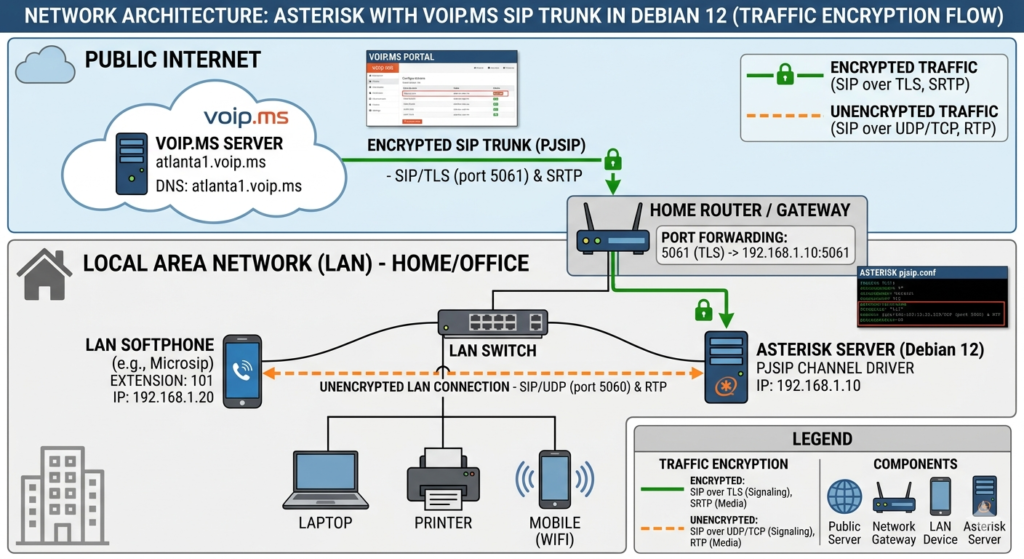
voip.ms Setup
Before we start on our Asterisk setup, we need to enable SMS on the voip.ms DID. Click DID > Manage DID > Edit. Then enable Message Service (SMS/MMS) and Link the SMS received to this DID to a SIP Account. Select the sub-account that you have configured as part of your voip.ms trunk in your Asterisk server.
Message Threading
One of the key issues to address is message threading – we want messages to be threaded properly by the clients. voip.ms will put the sender information as <number>@<pop server> – this can be made to work, but a more reliable approach is to normalize all addresses as <number>@asterisk.lan (where this is the hostname of the LAN Asterisk server) on inbound/outbound path and do rewrites as necessary on the Asterisk server. This works better with the clients and they all see the consistent path and information for inbound and outbound messages.
Routing To All Known Endpoints
We can use PJSIP_DIAL_CONTACTS(<extension>) to get all the registered contacts for the extension. Then we can loop through each and send the message to each on inbound path ensuring it is delivered to the registered endpoints for the extension.
Extracting the To Address
voip.ms puts the To address (your DID) in X-SMS-To header. This can be accessed using the MESSAGE_DATA function in Asterisk since it is a custom header.
Inbound SMS: voip.ms → LAN Clients
How voip.ms Delivers Inbound SMS
voip.ms sends a SIP MESSAGE to your server’s IP with the destination DID in a custom header:
MESSAGE sip:s@<asterisk_lan_address>:5061;transport=TLS SIP/2.0
From: "5555555555" <sip:5555555555@pop_server_address>
To: <sip:s@asterisk_lan_address:5061;transport=TLS>
X-SMS-To: <DID_Number>
Two things to note: the Request-URI user is s (not your DID), and the actual destination DID is in X-SMS-To. Your dialplan needs to read X-SMS-To to know which number was texted.
Dialplan
Add to /etc/asterisk/extensions.conf
[sms-inbound]
exten => s,1,NoOp(Incoming SMS from ${MESSAGE(from)})

 ; MESSAGE_DATA() reads custom SIP headers — MESSAGE() is only for core attributes
 same => n,Set(TARGET_NUMBER=${MESSAGE_DATA(X-SMS-To)})
 same => n,Log(NOTICE, SMS to DID ${TARGET_NUMBER} body: ${MESSAGE(body)})

 ; Extract bare number from '"<number>" <sip:<number>@<pop_server>>'
 same => n,Set(RAW_FROM=${MESSAGE(from)})
 same => n,Set(FROM_NUM=${CUT(CUT(RAW_FROM,@,1),:,2)})

 ; Normalize to asterisk.lan — threads by number regardless of voip.ms edge server

 same => n,Set(ACTUAL_FROM=sip:${FROM_NUM}@asterisk.lan)

 same => n,Log(NOTICE, Normalized sender: ${ACTUAL_FROM})

 ; Set To to the internal extension, not the DID.
 ; Using the DID here causes clients to adopt it as their own SIP identity,
 ; which breaks outbound endpoint matching.
 same => n,Set(MESSAGE(to)=sip:[email protected])

 ; Get all registered contacts for extension 100
 same => n,Set(CONTACTS=${PJSIP_DIAL_CONTACTS(100)})
 same => n,Set(CONTACT_COUNT=${FIELDQTY(CONTACTS,&)})
 same => n,Log(NOTICE, ${CONTACT_COUNT} registered contact(s) for exten 100)
 same => n,GotoIf($[${CONTACT_COUNT} = 0]?no_contacts)
 same => n,Set(ITER=1)
 same => n,While($[${ITER} <= ${CONTACT_COUNT}])
  same => n,Set(CURRENT_CONTACT=${CUT(CONTACTS,&,${ITER})})
  ; CURRENT_CONTACT = PJSIP/100/sip:<client_ip>:<client_port> — field 3 is the SIP URI
  same => n,Set(CONTACT_URI=${CUT(CURRENT_CONTACT,/,3)})
  same => n,Log(NOTICE, Dispatching to pjsip:100/${CONTACT_URI} from ${ACTUAL_FROM})
  same => n,MessageSend(pjsip:100/${CONTACT_URI},${ACTUAL_FROM})
  same => n,Log(NOTICE, MessageSend status: ${MESSAGE_SEND_STATUS})
  same => n,Set(ITER=$[${ITER} + 1])
 same => n,EndWhile()
 same => n,Hangup()

same => n(no_contacts),Log(WARNING, SMS from ${FROM_NUM} to DID ${TARGET_NUMBER} dropped — no registered contacts for exten 100)
same => n,Hangup()
What the Client Receives
MESSAGE sip:100@<client_ip>:<client_port> SIP/2.0
From: <sip:<number>@asterisk.lan>
To:   <sip:100@<client_ip>>
The client threads the conversation under sip:<number>@asterisk.lan. Every future message from that number — regardless of voip.ms edge — matches that thread.
Outbound SMS: LAN Clients → voip.ms
Add to /etc/asterisk/extensions.conf
Dialplan
[sms-outbound]
; Match any 10 or 11 digit number
exten => _X.,1,NoOp(Outbound SMS from ${MESSAGE(from)} to ${EXTEN})
 ; Extract internal sender extension from 'sip:[email protected]'
 same => n,Set(RAW_FROM=${MESSAGE(from)})
 same => n,Set(SENDER_EXTEN=${CUT(CUT(RAW_FROM,@,1),:,2)})

 ; Set To for the voip.ms trunk — must use their domain, not asterisk.lan
 same => n,Set(MESSAGE(to)=sip:${EXTEN}@<pop_server>)

 ; Trunk identity — DID at voip.ms domain
 same => n,Set(TRUNK_FROM=sip:<DID_NUMBER>@<pop_server>)
 same => n,Set(TRUNK_TO=pjsip:voipms/sip:${EXTEN}@<pop_server>)
 same => n,Log(NOTICE, SMS from exten ${SENDER_EXTEN} to ${EXTEN} via ${TRUNK_TO})

 same => n,MessageSend(${TRUNK_TO},${TRUNK_FROM})

 same => n,Log(NOTICE, Outbound send status: ${MESSAGE_SEND_STATUS})
 same => n,GotoIf($["${MESSAGE_SEND_STATUS}" != "SUCCESS"]?failed)
 same => n,Hangup()

same => n(failed),Log(ERROR, Outbound SMS to ${EXTEN} failed: ${MESSAGE_SEND_STATUS})
same => n,Hangup()
What voip.ms Receives
MESSAGE sip:<to_number>@<pop_server> SIP/2.0
From: <sip:<DID_Number>@<pop_server>>
To:   <sip:<to_number>@<pop_server>>
Configuring Inbound And Outbound Contexts
For Inbound, we need to add the context to the voip.ms trunk in /etc/asterisk/pjsip.conf. Under the voip.ms endpoint section, add message_context=sms-inbound.
For outbound, we need to add the context to our extension’s configuration. In /etc/asterisk/pjsip_extensions.conf (since I am using the #include approach to keep local extension configuration separate from trunk configuration), under the extension endpoint section, add message_context=sms-outbound
Client Specific Quirks
I found linphone adopts the To header of the received message as their outbound SIP identity when replying. So if you extract the actual DID number and use it as the To address in the inbound message, you will see the same come back as sip:<DID_Number>@<asterisk_lan> when you reply from the client. This will fail as the <DID_Number> is not a valid extension. The fix is to simply make the To address in inbound messages be sip:<extension>@<asterisk_lan> – this works fine for both Jami and linphone. Jami works fine without this as well as it uses the configured client identity for the SIP trunk correctly.
Testing And Debugging
Use asterisk -rvvv and pjsip set logger on to see the actual traffic both from voip.ms and from your clients for inbound and outbound messages to understand what is actually being sent/received.